Features
Dashboard
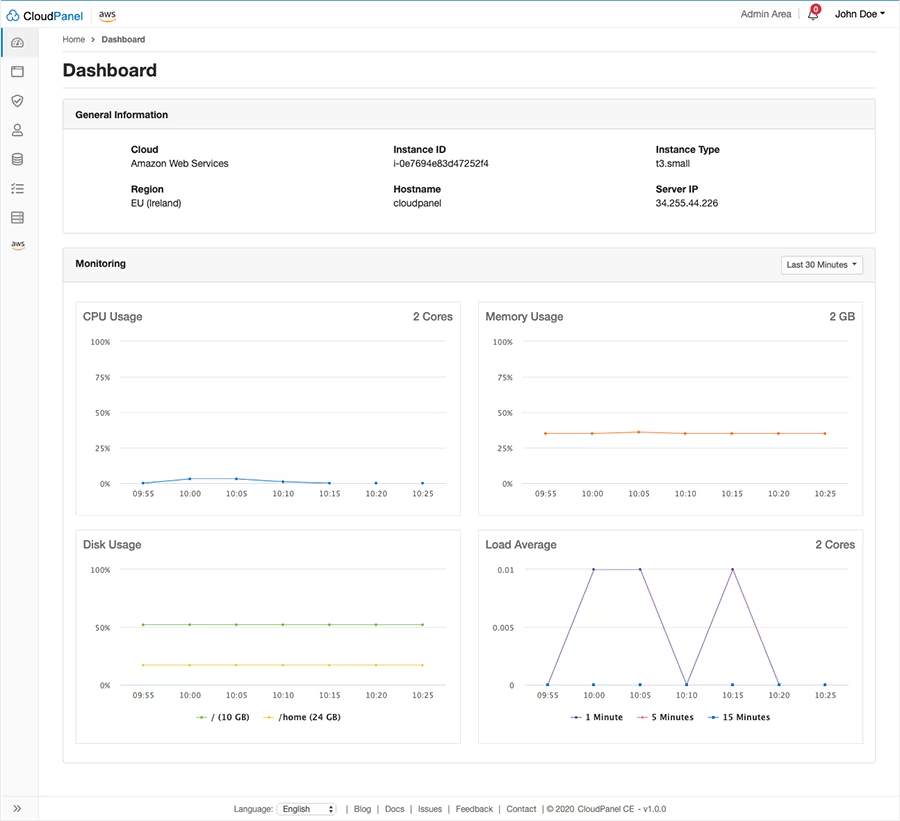
A section where you can monitor you system resources. It also give you a breif overview of your OS, hostname, hardware and ip address.
Site Management
The site management is simple and intuitive, you add your site, select what type of site you want to run, and the set your sites account details.
Once the site is created, you have access to features like SSH/FTP, Varnish Cache, vhost config and much more.
Admin Area
This is where you can create users, configure backup to 3rd party cloud providers, like google drive, amazon S3 etc.
There are many many more for more details visit there site for full details and installation, visit there site at cloudpanel.io
Installation and config
The installation was quite easy, you create an SSH key. Then login to the server via ssh update the os, i used Ubuntu minimal server on a self-hosted VM. The installation method i chose was the “Installation on Other” option.
For full instructions visit there installation page,
Once installed i and setup my domain i had a problem with the SSL too many redirects, but this was the nature of my setup. using cloudflare pointing to a VPS running pangolin, with a newt wireguard tunnel to my homelab.
If you have a simular setup then please use my vhost config below, Which is for WordPress.
server {
  listen 80;
  listen [::]:80;
  listen 443 quic;
  listen 443 ssl;
  listen [::]:443 quic;
  listen [::]:443 ssl;
  http2 on;
  http3 off;
  {{ssl_certificate_key}}
  {{ssl_certificate}}
  server_name www.domain.uk;
  return 301 https://domain.uk$request_uri;
}

server {
  listen 80;
  listen [::]:80;
  listen 443 quic;
  listen 443 ssl;
  listen [::]:443 quic;
  listen [::]:443 ssl;
  http2 on;
  http3 off;
  {{ssl_certificate_key}}
  {{ssl_certificate}}
  server_name domain.uk www1.domain.uk;
  {{root}}


  location ~ /.well-known {
    auth_basic off;
    allow all;
  }

  {{settings}}

  location ~/\.git {
    deny all;
  }

  location = /xmlrpc.php {
    deny all;
  }

  # Uncomment the following to exclude admin-ajax.php from basic auth if it breaks frontend functionality.
  #location ~* ^/wp-admin/admin-ajax\.php$ {
  #  auth_basic off;
  #}

  location ~/(wp-admin/|wp-login.php) {
    #auth_basic "Restricted Area";
    #auth_basic_user_file /home/site-user/.htpasswd;
    proxy_set_header X-Real-IP $remote_addr;
    proxy_set_header X-Forwarded-For $remote_addr;
    proxy_set_header X-Forwarded-Host $host;
    proxy_set_header Host $host;
    proxy_pass http://127.0.0.1:8080;
    proxy_max_temp_file_size 0;
    proxy_connect_timeout      7200;
    proxy_send_timeout         7200;
    proxy_read_timeout         7200;
    proxy_buffer_size          128k;
    proxy_buffers              4 256k;
    proxy_busy_buffers_size    256k;
    proxy_temp_file_write_size 256k;
  }

  location / {
    {{varnish_proxy_pass}}
    proxy_set_header Host $host;
    proxy_set_header X-Forwarded-Host $host;
    proxy_set_header X-Real-IP $remote_addr;
    proxy_set_header X-Forwarded-For $proxy_add_x_forwarded_for;
    proxy_hide_header X-Varnish;
    proxy_redirect off;
    proxy_max_temp_file_size 0;
    proxy_connect_timeout      720;
    proxy_send_timeout         720;
    proxy_read_timeout         720;
    proxy_buffer_size          128k;
    proxy_buffers              4 256k;
    proxy_busy_buffers_size    256k;
    proxy_temp_file_write_size 256k;
  }

  location ~* ^.+\.(css|js|jpg|jpeg|gif|png|ico|gz|svg|svgz|ttf|otf|woff|woff2|eot|mp4|ogg|ogv|webm|webp|zip|swf|map)$ {
    # WordPress Multisite Subdirectory
    rewrite ^/[_0-9a-zA-Z-]+(/wp-.*) $1 break;
    rewrite ^/[_0-9a-zA-Z-]+(/.*\.php)$ $1 break;
    add_header Access-Control-Allow-Origin "*";
    add_header alt-svc 'h3=":443"; ma=86400';
    expires max;
    access_log off;
  }

  if (-f $request_filename) {
    break;
  }
}

server {
  listen 8080;
  listen [::]:8080;
  server_name domain.uk www1.domain.uk;
  {{root}}

  include /etc/nginx/global_settings;

  try_files $uri $uri/ /index.php?$args;
  index index.php index.html;

  location ~ \.php$ {
    include fastcgi_params;
    fastcgi_intercept_errors on;
    fastcgi_index index.php;
    fastcgi_param SCRIPT_FILENAME $document_root$fastcgi_script_name;
    try_files $uri =404;
    fastcgi_read_timeout 3600;
    fastcgi_send_timeout 3600;
    fastcgi_param HTTPS "on";
    fastcgi_param SERVER_PORT 443;
    fastcgi_pass 127.0.0.1:{{php_fpm_port}};
    fastcgi_param PHP_VALUE "{{php_settings}}";
  }

  # WordPress Multisite Subdirectory
  if (!-e $request_filename) {
    rewrite /wp-admin$ https://$host$uri permanent;
    rewrite ^/[_0-9a-zA-Z-]+(/wp-.*) $1 last;
    rewrite ^/[_0-9a-zA-Z-]+(/.*\.php)$ $1 last;
  }

  if (-f $request_filename) {
    break;
  }
}replace “domain.uk” with your domain name.
Resources & Performance
As per the image above, you can see that Cloudpanel is quite lightweight. Yes this is running only one site, but it is only on “3 cores” (2x phyical cores and 1x thread). and only 2GB of memory. Which for a full stack NginX server, MySQL database, PHP (up to 8.4), redis and varnish cache, in my opinion is very good for a homelab environment.
Final Thoughts
If you want to self host your own Web Stack for a website or even a development enviroment, then i this cloudpanel is a great choice. it was easy to install, configure and responsive. Why not go and give the live demo a go and see what you think.