What Is Opencloud
open cloud is a person self-hosted cloud platform, written in go. making fast and lightweight. It has many features and is perfect for simple file management and sharing.
Features
File management and sharing
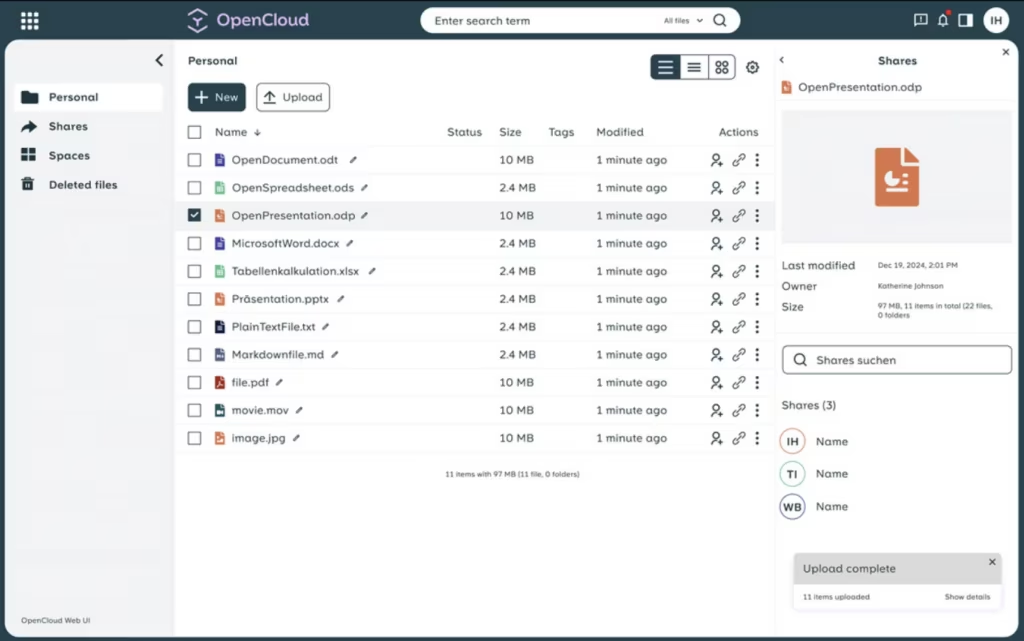
This is the primary feature of any cloud solution, and OpenCloud does it really well. The interface is clean and easy to use. It offers drag-and-drop upload, which makes uploading a breeze. The sharing feature is really well thought out too. You simply select the file, right-click, and select share. There are two options.
Versioning
This allows you to keep multiple versions of the same file, if you edit a file and need to go back, this is where version comes in to place. It is very handy and is very well integrated. select the office document, click the three dot, and click details. In the right sidebar, click versions and you will have all versions of that document. There is an obvious limitation to this, it will only keep versions of the file that is edited on Onlycloud.
Web office
I personally haven’t got this feature working, but i haven’t given up. The theory is that you or your team can edit files directly in the browser in real time. The feature uses Collabora web office, but is suppose to be compatible with OnlyOffice too. but i am yet to confirm it. Once i have more i will update this article.
Other features
There are load of other features and ill be here all day sharing them with you, visit there website for more feature and details
Installation
I found this a bit trick to be honest, but once i figured it out, i felt silly, because it was quite simple.
There is a template on the Unraid community apps by “joly0”.
Either SSH into your unraid server or use the web terminal from the UI. The follow these intructions
mkdir -p /mnt/user/appdata/opencloud/config
mkdir -p /mnt/user/opencloud/data
find /mnt/user/appdata/opencloud -type d -exec chmod 751 {} \;
find /mnt/user/opencloud -type d -exec chmod 751 {} \;
This will setup the directories.
Then in the unraid Community apps, search for opencloud and click install ad configure as the screenshot below
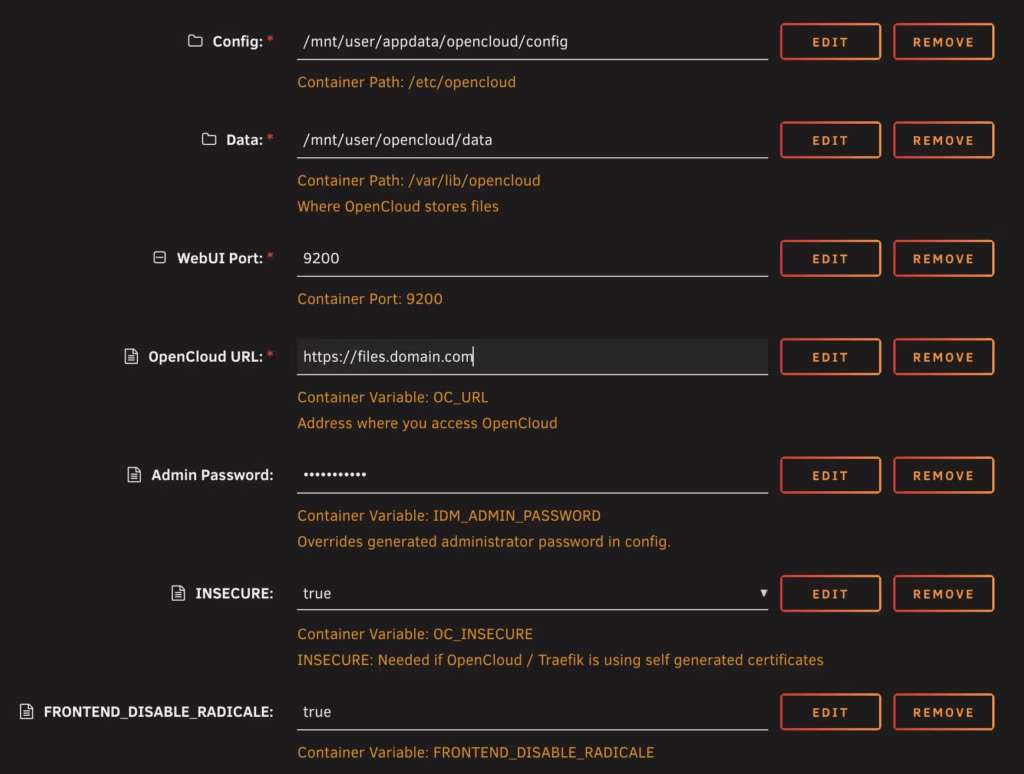
add the bottom variable as the docker container does not have radicale installed, this is the calendar feature.
I use pangolin, but it should be the same for other reverse proxies, or cloudflare tunnels.
Sign into your instance create a pubic resource name it, and ass the subdomain.
Then add a target use https:// enter the ip address of your opencloud instance and the port 9200 (unless you changed it.) the click save.
The you should be done. and it should be working.
Final Thought & Perfromance
Because Opencloud is written in Go. is is very lightweight as mentioned before. in my server i found that the CPU usage was around 0.4 – 0.5%, the memory was stable at about 122MB.
I have used many other alternatives, nextcloud, owncloud and filebrowser. They have all been either bloated, have poor performance or laking in the core feature i want. this is why i am so excited about Opencloud. It knows what it want to be and do. and does it very well dare i say perfectly.
Edited on 19 May 2026